July 7, 2026
·
12 min read
Testimonial.to vs Shapo for testimonial collection and display
A fair comparison of Testimonial.to vs Shapo for collecting and displaying testimonials — decision snapshot, collection and consent flows, curation workflows, embedding options, integrations/automation, plus when a third option like ShowTrust fits best.


Picking a testimonial tool sounds simple until you’re juggling collection links, approval queues, and embeds that actually match your site. Then you realize “easy to collect” and “easy to publish” aren’t always the same product.
This comparison walks you through where Testimonial.to and Shapo differ in the real workflow: how you request testimonials, handle media and consent, curate and maintain a library, and ship widgets or a public wall without performance surprises. You’ll also see when ShowTrust is a practical third option if you want collection, management, and display in one place.
Decision snapshot
You’re choosing between two parts of the same system: collection and display. Collection is how you request, capture, and verify testimonials. Display is how you publish them where prospects decide, like landing pages and pricing pages.
Pick the tool that matches your workflow, not the longest feature list. If your process is “ask → approve → ship to site,” optimize for the bottleneck.
Your core job
Your work splits into three jobs, and each one fails differently. Capture is about getting a response with the right format and consent. Curation is about approving, tagging, and keeping quality high.
Publishing is about placing proof at decision points.
If one step is clunky, the whole loop slows down.
Fast self-check
Answer these before you compare pricing tiers. They reveal whether you need a collector, a publisher, or a full loop.
- Do you need video, text, or both?
- Do you require approval before anything goes live?
- Do you need embeds, widgets, or just a hosted wall?
- Will teammates manage reviews and tags?
- How sensitive is your spend right now?
Your answers point to workflow fit, not brand preference.
When each wins
Testimonial.to is often the safer pick when you want an end-to-end path from request to on-site embeds. It tends to suit teams that want collection, moderation, and publishing in one place.
Shapo is often the better match when you mainly want a clean public “wall” of social proof and a lightweight way to show it off. It can be a simpler choice when display is the priority.
If you want both collection and flexible on-site display without compromises, look at ShowTrust too. It’s built around the full loop: shareable collection, organized approvals, embeddable widgets, and a public wall.
Non-negotiables
Confirm these in a demo, even if the UI looks perfect. Small gaps here create real risk later.
- Explicit consent and attribution controls
- Spam control and submission safeguards
- Moderation, approval, and revision flow
- Export options for portability
- Integrations you actually use
- Fast-loading embeds and pages
If any of these are weak, you’re buying future friction.
Collection experience
Your collection experience lives or dies on two things. How easy it is for customers to submit, and how usable the result is for marketing.
Testimonial.to and Shapo both aim to reduce friction, but they make different tradeoffs. The right pick depends on whether you prioritize volume, polish, or governance.
Request flows
Both tools succeed when you can ask once and make replying effortless. The details matter, because every extra step drops completions.
Testimonial.to typically centers on a shareable collection link that opens a dedicated submission page. Shapo also leans on link-based requests, often with a cleaner “send this link anywhere” approach, so you can DM it after a support win.
If your buyers live in inboxes and DMs, link-first beats complex workflows every time—and pairing it with a strong outreach message (like this testimonial request email generator) can lift completion rates without adding steps to the flow.
Test your flow on a phone first. That’s where most submissions happen.
Prompting quality
Generic praise is easy to collect and hard to use. Strong prompts turn “great product” into a specific, believable story.
- Use role and company prompts for context
- Ask for before-and-after outcomes, not adjectives
- Request a concrete moment or use case
- Offer short examples of “good answers”
- Guide length with soft limits
Better prompts don’t just improve writing. They improve credibility.
Media handling
Media support changes who will actually submit. Some customers will type, but many prefer a quick video.
Testimonial.to is commonly chosen for video testimonials, with flows designed around recording and uploading. Shapo often focuses on making testimonials easy to capture and share in social-friendly formats, but you should still check the exact constraints that matter to you, like upload size, accepted formats, recording on mobile, and whether contributors can re-record easily.
Test your flow on a phone first. That’s where most submissions happen.
Consent and rights
Publishing testimonials is a permissions problem, not a design problem. You need clear consent for reuse, especially for video, names, and logos.
In both tools, verify you can capture explicit permission at submission time, control attribution fields, and store the consent record with the testimonial. Also confirm whether contributors can request removal, and how you’ll handle edits when someone changes roles or company names.
If you can’t prove consent later, you’ll hesitate to publish now.
Spam and validation
Open links attract low-quality submissions over time. Basic validation keeps your wall from turning into a cleanup project.
- CAPTCHA or bot protection on forms
- Email verification for submitters
- Duplicate detection for repeat entries
- Manual review before publishing
- Internal notes for vetting context
Treat validation as part of collection, not moderation. It saves hours later.
Curation and management
Collecting testimonials is easy. Keeping them accurate, organized, and usable six months later is the hard part.
Testimonial.to and Shapo both cover the basics of moderation and display. The real difference shows up when you need repeatable workflows across products, pages, and teammates.
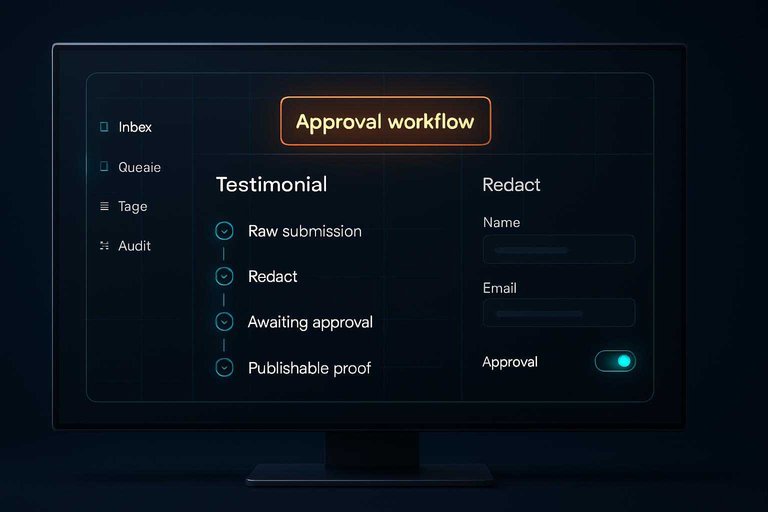
Approval workflow
You need a path from raw submission to publishable proof. The goal is consistency without slowing marketing down.
- Review new submissions in an inbox or queue.
- Edit for clarity, while preserving the customer’s meaning.
- Redact sensitive details like names, emails, or internal metrics.
- Approve and assign where it should appear (site, landing page, wall).
- Schedule or rotate publishing so channels stay fresh.
If scheduling feels manual, you’ll default to “set and forget.”
Organization tools
Once you have more than a handful of testimonials, retrieval becomes the job. You want to find the right quote fast for the right page.
Testimonial.to typically fits teams that want a straightforward library and simple publishing flows. Shapo often appeals when you want a cleaner “showcase” feel and quick browsing of entries.
Where both can get strained is multi-dimensional organization. Think product line, persona, industry, objection handled, and use case, all at once.
Look for tagging plus search that works the way your marketers think. Otherwise, great proof stays buried.
Team collaboration
Your needs change fast with more hands involved. A founder-only workflow is different from an agency managing ten clients.
- Role-based access: admin, editor, viewer.
- Approval permissions by space or client.
- Internal comments on edits and redactions.
- Audit history for changes and removals.
- Client handoff: exports or shared views.
If you can’t answer “who changed this,” you’ll ship less proof.
Lifecycle upkeep
Testimonials go stale when your offer changes. They also go risky when they reference old pricing, deprecated features, or outdated results.
A practical upkeep loop is simple: flag older entries, request quick refresh confirmations, and replace or retire anything that no longer matches your positioning.
You also need clean removal handling. If a customer asks to delete, it should disappear everywhere, including embeds.
If you want collection, curation, and publishing to stay linked, a third option like ShowTrust can be worth a look. It’s built around collecting via shareable forms, organizing approvals, and then reusing the same approved proof across widgets and a public wall.
Upkeep is the difference between social proof and social liability.
Display and embedding
Testimonial collection is only half the job. The real leverage comes from how fast you can turn reviews into on-site proof without hurting page speed.
Widget options
You’re choosing where proof shows up and how intrusive it feels. Start with the formats most teams actually deploy.
- Sliders: homepages and landing pages
- Grids: pricing pages and case studies
- Popups: exit intent and promos
- Badges: headers, footers, checkout
- Carousels: hero sections and sidebars
Match the widget to the decision moment, not the design trend.
Customization depth
Assess customization like you’d assess a UI component library. You want it on-brand, responsive, and accessible without fighting the tool.
Check for brand controls like fonts, colors, and spacing, plus layout options like cards, avatars, and rating styles. Also verify whether you get CSS hooks, solid mobile defaults, and accessibility basics like keyboard navigation and readable contrast.
If you need pixel-level control, “no-code only” becomes the constraint, not the feature.
Public wall page
A public wall page can work like a lightweight proof hub. It’s useful when you want something shareable without building a custom page.
Compare whether Testimonial.to and Shapo provide an indexable page, customizable metadata, and clean URLs. Look for filtering by product, persona, or tag, plus sharing options that don’t feel clunky.
If neither wall fits your workflow end-to-end, a third option like ShowTrust can be worth a look because it combines collection, curation, widgets, and a public wall in one place.
Performance tradeoffs
Treat testimonial embeds like any third-party script. You’re trading convenience for runtime cost.
- Inspect script weight and request count in DevTools.
- Verify lazy loading below the fold and on route changes.
- Check caching behavior and CDN usage for media.
- Confirm third-party dependencies and failure behavior.
- Test with and without the widget on core landing pages.
If a widget slows your money pages, ship less proof there, not more. For implementation details, see how embed code works.
Integrations and automation
Integrations decide whether testimonials become a repeatable system or a one-off project. Testimonial.to and Shapo can both work, but the best choice depends on where your customer data lives and how you trigger requests—and whether your tool can carry the feedback all the way through to publishing without extra manual steps.
Native integrations
Look for integrations that match your existing “system of record,” not just what’s trendy.
- CRM and sales pipeline
- Email marketing and lifecycle
- Support and help desk
- Calendar and scheduling
- Payments and subscriptions
If a key category is missing, plan on Zapier or an API on day one—and make sure the testimonial tool can still reliably route submissions into review and publishing once they arrive.
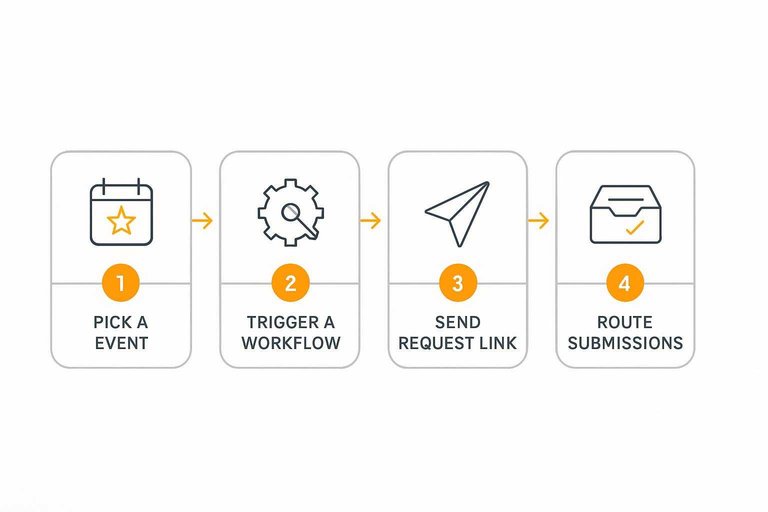
Automation workflows
Automation works best when it triggers from a real customer moment.
- Pick an event: purchase, milestone, renewal, or ticket resolution.
- Trigger a workflow in your CRM, email tool, or Zapier.
- Send a testimonial request link with minimal friction.
- Route submissions to review, tagging, and approval.
- Publish to the right widget or wall automatically.
If you can’t route, tag, and publish smoothly, you’ll collect feedback that never ships. Tools that cover the full loop (collection link → approval/curation → embeddable display) tend to reduce the number of handoffs where things stall.
Data portability
Plan for switching costs before you commit. Check whether Testimonial.to and Shapo support exports, what formats you get, and whether media files download cleanly.
Backups matter too. Look for an API, webhook access, or at least a reliable way to mirror entries into your CRM or a spreadsheet.
If portability feels vague, consider a third option like ShowTrust, which focuses on the full loop: shareable collection links, curation, embeddable widgets, and a public testimonials wall you control.
Attribution basics
Attribution makes testimonials reusable across pages and campaigns.
- Campaign source and medium
- Product or plan name
- Persona or segment tag
- Placement page or widget
If you can’t tag context at capture time, you’ll waste strong quotes later. Even basic fields during submission review can save hours when you’re curating testimonials for specific landing pages or widgets.
To avoid issues down the line, it’s also worth aligning your capture flow with GDPR checkbox requirements so consent is explicit and reusable.
Third option: ShowTrust
If you want one tool to handle collection, curation, and on-site display, a third option can reduce handoffs. ShowTrust is a credible middle path when you like parts of Testimonial.to and Shapo, but want a tighter end-to-end flow. It’s built around turning feedback into trust signals you can publish and reuse without extra glue work.
Where it fits
A third tool helps when your process breaks at the seams. You collect feedback in one place, curate it in another, then scramble to publish it everywhere.
Imagine you need:
- A shareable link or form for requests
- A simple approval and organization step
- Embeddable widgets for key pages
- A public “wall” prospects can browse
That’s the gap ShowTrust aims to bridge, without forcing a complex stack.
Checklist comparison
Don’t compare tools by vibe. Compare them by the exact capabilities your workflow needs.
- Collect via shareable link or form
- Manage, approve, and organize submissions
- Embed widgets on key pages
- Publish a public testimonials wall
- Reuse testimonials in marketing assets
If one box is missing, you’ll rebuild it with tools and time.
Who should pass
You don’t need a third option if your current setup already works. Switching costs are real, even when the feature list looks cleaner.
Stick with Testimonial.to or Shapo if you:
- Already have a solid request-and-approval workflow
- Only need one output, like a simple widget
- Prefer your existing marketing tooling for reuse
The best tool is the one you’ll actually keep updated, weekly.
Pricing and value
Pricing is only half the decision. The real question is what gets limited when your testimonial volume, team, or displays grow.
| What you’re optimizing for | Testimonial.to | Shapo | Value signal to watch |
|---|---|---|---|
| Low-volume solo use | Often fits basics | Often fits basics | Free/entry plan limits |
| More testimonials over time | Check caps | Check caps | Storage and moderation |
| Multiple teammates | Team features vary | Team features vary | Seats and roles |
| More places to show proof | Widget options vary | Widget options vary | Embeds and pages |
| End-to-end workflow | Strong collection focus | Strong display focus | Gaps between steps |
If you need collection plus curation plus multiple displays, price should follow workflow coverage, not the other way around.
A quick third option to consider is ShowTrust if you want the full loop in one place: shareable collection link/form, approve and organize submissions, embeddable widgets, and a public testimonials wall you can point prospects to. That tends to be “value” when you’re scaling trust signals across pages and campaigns, not just storing quotes.
Choose based on your full workflow, not just the widget
- Start with your core job: do you need higher-response collection, cleaner approvals and organization, or faster on-site publishing?
- Sanity-check non‑negotiables: consent/rights, spam validation, media support, and how much customization you must control.
- Map the “last mile”: widgets vs a public wall page, load/performance considerations, and how updates will stay current over time.
- If you want a single system that covers collection (shareable link/form), curation (approve & organize), and embeddable + public-wall display, include ShowTrust in your shortlist alongside Testimonial.to and Shapo and compare on fit rather than features alone.
Frequently Asked Questions
- Is Testimonial.to vs Shapo for testimonial collection and display better for B2B SaaS or ecommerce sites?
- Both can work for either, but the better choice is usually the one that matches your funnel: B2B teams often prioritize approval workflows, tagging, and sales-enablement views, while ecommerce teams often prioritize fast collection and lightweight widgets that don’t slow pages down.
- Can I migrate testimonials from Testimonial.to to Shapo (or the other way around) without losing formatting?
- Usually you can migrate the core content (name, company, quote, media links) via CSV export/import or manual copy, but you may lose widget styling and embed settings because those are tool-specific.
- How do I measure whether my testimonial widgets are actually improving conversions?
- Track widget impressions and clicks (if available), then measure downstream actions with GA4 events (e.g., CTA clicks, form submits) and run an A/B test that compares pages with and without the testimonial embed.
- Should I put testimonials on every page or only on key pages?
- Put testimonials where they reduce purchase anxiety: pricing, checkout/demo request, and high-intent landing pages first, then expand to product pages and key comparison pages if you can keep them relevant and updated.
- What if I want a public “testimonials wall” plus embeddable widgets—do Testimonial.to and Shapo both cover that?
- Some plans/tools offer both, but the specifics vary by product; if a public wall plus embeds is a must-have, check each tool’s page/wall options and embed limits, or consider ShowTrust if you want collection, curation, a public page, and widgets in one workflow.
Turn Feedback Into Trust
After comparing collection flows, curation, embeds, and automations, the real win is having one simple system you’ll actually use to publish proof fast.
ShowTrust helps you collect testimonials with a shareable link, approve and organize them, then showcase them via widgets or a public wall so prospects can verify trust quickly.
Written by
ShowTrust
Notes from the ShowTrust team on collecting testimonials and building authentic social proof.
Share: