June 3, 2026
·
Updated June 10, 2026
·
9 min read
How Video Testimonials Get Collected (Behind the Scenes)
An explainer on how video testimonials are collected end-to-end—from first outreach to final approvals—breaking down the collection pipeline, pre-interview prep, recording-day operations, post-production assembly, and legal/compliance basics so you know what happens behind the scenes.

Video testimonials look effortless: a customer tells a clear story, the sound is clean, and the quotes feel perfectly on-message. What you don’t see is the careful process required to get that authenticity without scripting or pressure.
This behind-the-scenes explainer walks you through every stage—how teams source the right voices, secure consent, prep interviews, run recording day, and shape a story in post. You’ll learn what’s planned, what’s improvised, and where compliance and approvals fit so your next testimonial is smoother and more trustworthy.
The Collection Pipeline
Collecting a video testimonial is a relay race, not a single request. Each handoff protects quality, consent, and schedule so you end with a clip you can actually publish.
Source the right voices
You want voices that sound credible on first listen. Pick candidates who can anchor a specific story, not just say “love it.”
- Recent, specific success
- Clear, repeatable use-case
- Recognizable role or title
- Plainspoken, low-jargon style
- Comfortable on camera
If you can’t name the before-and-after, you’re not sourcing. You’re hoping.
Timing and triggers
Requests land best when the value is fresh and emotionally available. You’re borrowing a moment of relief or pride, then turning it into a story.
A few triggers consistently beat “random Tuesday.” Milestones, resolved support threads, renewals, and completed onboarding all create a clean narrative arc.
Miss the moment and you’ll need twice the follow-up. Momentum is the real asset.
The ask mechanism
Different channels change the tone of the request and the friction to say yes. Choose based on relationship depth and how targeted you need the story to be.
| Channel | Best when | Upside | Tradeoff |
|---|---|---|---|
| CSM email | Strong relationship | High trust | Slower, manual work |
| In-app prompt | High product engagement | Low friction | Lower context, generic |
| Community post | Active community voices | Social proof | Less control, noisy |
| Sales follow-up | Deal just closed | Clear next step | Feels transactional |
The channel is part of the message. Pick one that matches the relationship.
Consent and permissions
You need permission before you need performance. Clear terms prevent rework, takedowns, and awkward internal debates later.
- Usage rights across channels
- Duration of permission
- Revocation and takedown process
- Brand and logo guidelines
- Disclosure and compliance requirements
If consent is fuzzy, everything downstream becomes fragile. Especially distribution.
Scheduling logistics
Scheduling is production, even when it looks like admin. Tight logistics keep throughput predictable and reduce costly no-shows.
Teams standardize on a booking link, time-zone detection, and automated reminders. They also keep buffer slots and a clear reschedule rule to protect the calendar.
Your calendar is the factory floor. Treat it like one.
Pre-Interview Preparation
Great testimonials rarely happen by accident. The best teams engineer them before anyone hits record, using research and tight framing.
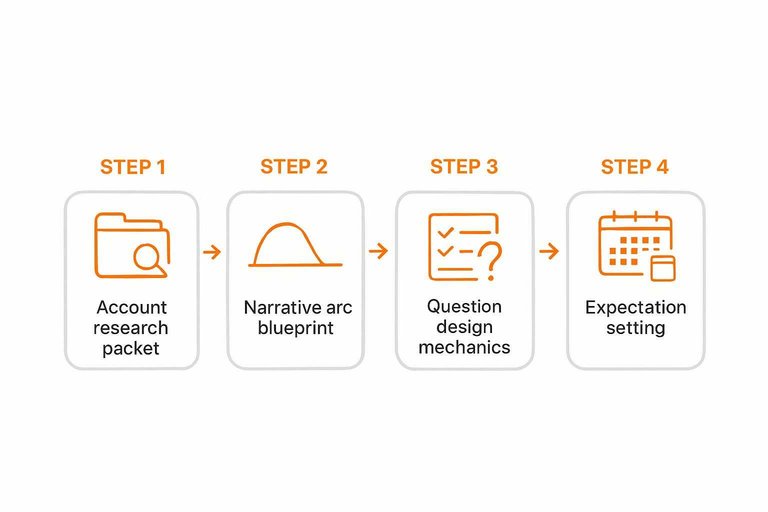
Account research packet
You want the guest talking about real moments, not brand slogans. A research packet gives the interviewer sharp context and safer footing.
- Product usage notes and workflows
- Support history and recurring tickets
- Goals, constraints, and success criteria
- Objections heard and how handled
- Stakeholders, roles, and influence map
Generic soundbites happen when you ask generic questions.
Narrative arc blueprint
A simple story shape keeps the interview from turning into a feature tour. Viewers trust stories when the sequence makes sense.
Before: what life looked like, and what hurt.
Turning point: what triggered change, and why now.
After: what’s different day-to-day, and what still isn’t perfect.
Structure signals honesty, because it leaves room for tradeoffs and tension.
Question design mechanics
The goal is specifics, not opinions. Prompts should force a memory, a decision, or a measurable change.
If you need a fast starting point, use a testimonial question generator to pressure-test your prompts before the call.
- Start with “What happened?” to anchor a real event.
- Use “How did you decide?” to reveal criteria and tradeoffs.
- Ask “What changed?” to surface workflow impact.
- Add “What surprised you?” to capture the human detail.
- Follow with “Can you give an example?” when answers drift.
If you can’t picture the scene, the viewer won’t either.
Incentives and ethics
Thank-you gifts should reward time, not buy sentiment. The clean framing is simple: you appreciate participation, and honesty is the point.
Many teams also confirm disclosure expectations up front. Credibility survives when the audience can tell nothing was hidden.
Expectation setting
Surprises create nervous guests and guarded answers. A quick pre-brief sets boundaries and gives the guest control.
- Estimated recording length and format
- What gets edited and why
- Approval process, if any
- Topics to avoid or redact
- Where the video will appear
Calm guests tell better stories. Every time.
Recording Day Operations
Recording day is equal parts technical discipline and human judgment. Your job is to remove friction so a real story can show up on camera — and to capture it cleanly enough that it can later function as credible social proof (the kind of asset tools like ShowTrust are built to collect, curate, and present without losing the human voice).
Tech setup checklist
You want a minimum viable setup that survives real-world chaos. Prioritize audio because viewers forgive soft video, not muddy words.
- Use a close mic, not the camera mic
- Place one soft key light at 45 degrees
- Frame mid-chest to headroom, eye-level lens
- Choose a quiet, simple background with depth
- Confirm stable upload, then record locally
If your audio is clean, you can cut around almost anything else — and you’ll have testimonial clips that feel trustworthy when embedded on a site or displayed in a curated wall later.
Remote vs on-site
Remote and on-site both work, but they fail differently. Your workflow should match the likely failure mode.
| Dimension | Remote | On-site | Typical failure mode |
|---|---|---|---|
| Environment | Uncontrolled room | Controlled set | Noise, echo |
| Gear | Mixed consumer devices | Standardized kit | Bad mic choice |
| Crew roles | Host multitasks | Separate operators | Missed levels |
| Backups | Local + cloud | Dual recorders | Single point failure |
Choose the format that gives you control over the risk you can’t fix in edit. The more consistent the capture, the easier it is to approve, organize, and publish a set of customer stories as public-facing proof.
Warm-up and rapport
People don’t “perform” honesty on command. A few minutes of calm, specific rapport gets you natural pacing and real detail.
Small talk should be situational, not generic.
Confirm consent again, and name what will happen with the footage.
Preview topics in plain language, so they’re not guessing your agenda.
When they stop trying to “get it right,” the story gets usable — and it also becomes the kind of candid testimonial prospects can quickly verify and trust when they see it later.
Directing without bias
You want clarity without planting words in their mouth. Direct the shape of the answer, not the conclusion.
- Ask neutral prompts like “What happened next?”
- Reflect back their phrasing, then pause.
- Request specifics: moment, metric, or decision.
- Separate feelings from facts with two questions.
- Offer a re-ask, not a correction.
If you hear your own marketing language, you’re steering too hard. The goal is language the customer would actually stand behind — which also makes approval and curation (whether in a doc or a tool like ShowTrust) feel straightforward and credible.
Safety takes and backups
You’re protecting the session from one corrupted file or one missed sentence. Redundancy buys you editorial freedom without dragging the guest.
Record locally even if you’re on a video call.
Capture dual audio tracks when possible, like lav plus shotgun.
Grab 20–30 seconds of room tone for clean edits.
Do quick re-asks for names, numbers, and tight story beats.
Reshoots cost more than money; they cost trust, timing, and authenticity. And when your end goal is a publishable testimonial library you can confidently showcase, clean backups are what keep “usable” from turning into “almost.”
Post-Production Assembly
Raw footage is just raw material. Post-production turns it into a believable, usable testimonial asset.
The work is mostly selection, cleanup, and controlled review loops. Done right, you protect clarity and claims without sanding off personality.
Ingest and organization
You can’t edit what you can’t find. Ingest is where you prevent chaos later.
- Copy camera and audio cards into a dated master folder.
- Rename files with speaker, angle, and take number.
- Store masters as read-only, then create editable working copies.
- Log metadata: topics covered and quote timestamps.
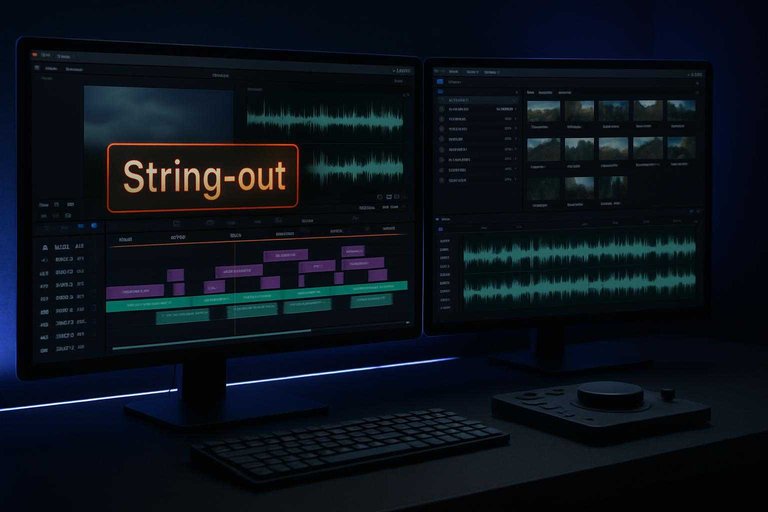
- Sync audio, then export a reference string-out.
If your logs are good, edits become decisions, not scavenger hunts.
Selects and story cut
Editors hunt for moments that feel real and hold up to scrutiny. The goal is a tight story cut that keeps meaning intact.
Look for specificity, clean emotion, and plain language. Avoid vague praise and risky claims you can’t defend. Keep it short because attention drops fast and long clips invite second-guessing.
Brevity isn’t style. It’s risk control and retention in one move.
Audio-first cleanup
People forgive imperfect video. They don’t forgive hard-to-listen audio.
- Reduce steady noise without warbling voices.
- EQ for intelligibility, not “radio” sound.
- Level dialogue for consistent loudness.
- De-ess harsh “S” sounds.
- Tame plosives and mouth clicks.
Clean audio reads as honest. Bad audio reads as edited, even when it isn’t.
Visual polish layer
Once the message is locked, visuals support it. The goal is attention and comprehension, not flash.
- Smooth jump cuts with timing and cutaways.
- Overlay b-roll to show what’s described.
- Add captions for silent and noisy viewing.
- Match color for continuity across shots.
- Apply brand frames for consistent placement.
Every visual choice either removes friction or adds it. Choose frictionless.
Review and approvals
Review loops exist because testimonials create public promises. You’re balancing persuasion with accuracy.
Internal review checks brand fit, clarity, and basic claim safety. Legal or compliance may flag phrasing, implied guarantees, or missing disclosures. Stakeholders sign off on positioning, then the customer approves final context and wording.
If a loop feels slow, it’s usually protecting you from shipping a claim you can’t unship.
Legal and Compliance
You can collect great testimonials and still get burned by one missing safeguard. Legal issues usually come from consent gaps, exaggerated claims, or sloppy data handling.
One clean compliance stack keeps your footage usable across channels—and aligning your process with your terms of service helps ensure everyone’s rights and responsibilities are clear.
| Safeguard | What it covers | Why it exists | Who owns it |
|---|---|---|---|
| Talent release form | Usage rights | Prevents permission disputes | Legal + Marketing |
| Claim substantiation | Results, comparisons | Avoids deceptive marketing claims | Marketing + Legal |
| Privacy notice | Data collection | Meets privacy obligations | Legal + Security |
| Data retention policy | Storage, deletion | Limits exposure over time | Security + Legal |
| Minor consent process | Under-18 subjects | Protects minors, reduces risk | Legal + Producer |
If your team can’t name the owner, the safeguard won’t happen when it matters.
— Section 5: — Section 5: Publishing, Distribution, and Lifecycle Management — —
Collecting the footage is only half the job. The real value shows up when your team can reliably publish, find, reuse, and retire testimonial assets without turning every request into a scavenger hunt.
Package the deliverables, not just the edit
A “final video” is rarely enough. You want a set of assets that can travel across web, sales, product, and social without rework.
- A clean master export plus a web-optimized version
- Captions (burned-in and a separate caption file)
- A thumbnail option that reads well at small sizes
- A short quote pull for pages and decks
- A one-paragraph context blurb: who it is, what changed, and what product area it references
If the testimonial can’t be dropped into a landing page or a sales deck in minutes, it won’t get used.
Build a searchable testimonial library
The fastest way to waste great stories is to store them as files named “Final_Final_UseThisOne.mp4.” Treat testimonials like a content system.
Tag each asset by:
- Persona (role, seniority)
- Industry or segment
- Use-case and workflow
- Product area(s) referenced
- Proof type (speed, reliability, collaboration, cost control, risk reduction)
- Claim sensitivity (safe, needs context, avoid)
- Expiration/refresh date if terms or product reality can drift
A library makes “how to collect video testimonials” feel like a repeatable pipeline, because distribution becomes a lookup—not a new project.
Publish with context and claim discipline
Testimonials break when you strip away the conditions that made them true. Keep enough context that the viewer can trust what they’re seeing.
- Avoid Franken-quotes: don’t splice meaning into a new promise
- Pair strong statements with the scenario that produced them
- If you add on-screen text, mirror what the customer actually said
- Don’t let a headline turn a specific win into a universal guarantee
If you need a deeper walkthrough on collection methods, tooling, and automation to make this repeatable end-to-end, see how to set up a video testimonial collection workflow.
If you need a deeper walkthrough on formats, placement, and UX/SEO gotchas, see how to embed testimonials on your website.
The goal is persuasion that survives scrutiny, not a cut that wins an internal debate.
Create a refresh and retirement loop
Testimonials age. Roles change, products evolve, and what was once accurate can become misleading if it lingers unchanged.
A simple lifecycle policy keeps you safe and current:
- Review high-visibility assets periodically for accuracy and product fit
- Re-confirm permission when expanding usage into new channels
- Retire clips that no longer reflect the product or the customer’s situation
- Keep an internal “do not use” list to prevent accidental reuse
Good teams don’t just publish. They maintain credibility over time.
Run Your Next Testimonial Like a System, Not a One-Off
The best testimonials come from a repeatable workflow: source and time outreach thoughtfully, prep an interview that protects authenticity, run a calm recording day with backups, and edit for clarity without changing meaning. Treat consent, releases, and review steps as part of production—not paperwork you chase at the end. If you document this pipeline once (checklists, templates, and roles), each new testimonial becomes easier to collect, faster to approve, and more consistent to publish.
Frequently Asked Questions
- How do I choose the right customers to ask when figuring out how to collect video testimonials?
- Start with customers who’ve achieved a clear, specific outcome and can describe the before/after in plain language. Prioritize people who are enthusiastic, articulate, and represent the audience you want more of (industry, use case, company size).
- What questions should I ask to get a strong video testimonial without sounding scripted?
- Use prompts that elicit a story: “What was happening before you chose us?”, “What did you try before?”, “What changed after?”, and “What would you tell someone considering it?”. Ask for concrete moments and examples, then follow up with “Can you walk me through that?” to get natural detail.
- How do I collect video testimonials remotely if the customer won’t do a live interview?
- Send a simple self-record setup: 3–5 prompts, framing guidance (eye-level camera, quiet room), and a deadline, then let them record on their phone or laptop. Offer an option to upload multiple short takes so you can stitch together the best, most natural lines.
- How do I measure whether video testimonials are actually working?
- Track where testimonials are used (landing pages, ads, sales sequences) and compare engagement and conversion signals like click-throughs, form completions, and sales-cycle velocity. Also ask sales/support which clips get referenced most in calls and objections they help resolve.
- What’s the easiest way to request and publish testimonials after you collect the video?
- Centralize requests, approvals, and publishing so clips don’t get stuck in email threads; a tool like ShowTrust can help you send a shareable request link and then embed approved testimonials on your site. Keep each testimonial tagged by persona and use case so marketing and sales can find the right clip fast.
Turn Testimonials Into Trust
Once you’ve mapped the pipeline—prep, recording, editing, and compliance—the real challenge is collecting and publishing video testimonials consistently without extra coordination overhead.
ShowTrust makes it easy to request video testimonials, approve and curate submissions, and embed or publish them as verified trust signals that lift conversions.
Written by
ShowTrust
Notes from the ShowTrust team on collecting testimonials and building authentic social proof.
Share: